
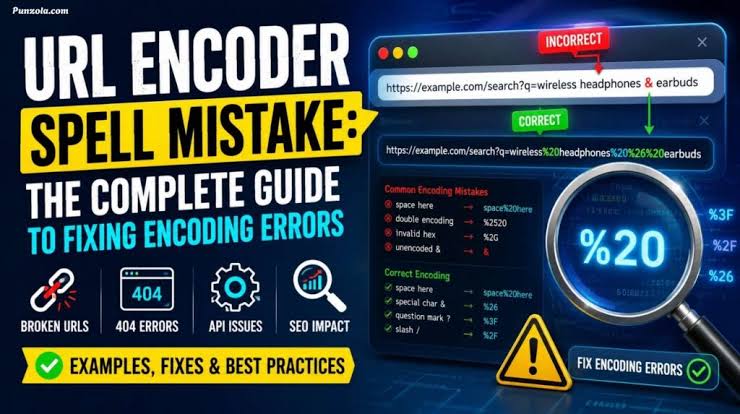

In the world of websites, even a tiny character mistake can break an entire system. One of the most overlooked issues developers, bloggers, and SEO professionals face is what many call a URL encoder spellmistake. It may sound technical, but in reality, it’s a simple problem that can have serious consequences—broken links, lost traffic, and poor user experience.
This guide explains what this issue really means, why it happens, and how you can prevent it from silently damaging your website performance.
What Is a URL Encoder Spellmistake?
A URL is the address of a web page, but it cannot always contain spaces, symbols, or special characters directly. That’s where URL encoding comes in. It converts unsafe characters into a format that browsers can understand—for example, a space becomes %20.
A URL encoder spellmistake happens when:
- Characters are incorrectly encoded
- Encoding is applied twice
- Special symbols are missed or miswritten
- Manual editing introduces errors in encoded strings
In simple terms, it’s a formatting mistake in how a web address is encoded or structured.
Why URL Encoding Matters More Than You Think
Search engines and browsers rely on clean, properly formatted URLs. Even a small encoding error can cause:
- Pages not loading properly
- Broken redirects
- Lost SEO rankings
- Tracking issues in analytics tools
- Poor user trust when links fail
From an SEO perspective, URL accuracy is not optional—it’s essential.
I once worked on a blog migration project where a single incorrectly encoded ampersand (&) caused hundreds of product links to break silently, and traffic dropped within days before we even noticed.
How Encoding Errors Usually Happen
Most encoding mistakes don’t happen randomly. They usually come from predictable situations:
- Copy-pasting URLs from browsers or documents
- Switching between CMS platforms
- Improper use of URL encoding functions in code
- Manual editing of query parameters
- Double encoding during redirects
For example, a correctly encoded URL might look like:
But a broken version could become:
That %2520 is a classic double-encoding mistake.
How Encoding Errors Affect Live Websites and Traffic
Imagine an e-commerce website running a seasonal sale campaign. The marketing team shares hundreds of product links across email, WhatsApp, and social media.
Now suppose a URL encoder issue occurs in the tracking system, turning all spaces into incorrect encoding patterns. Users clicking those links are suddenly redirected to error pages.
The result?
- Drop in conversions
- Increased bounce rate
- Lost ad budget efficiency
- Customer frustration
This kind of problem often goes unnoticed until analytics reports show something is wrong.
Common URL Encoding Mistakes and Their Effects
Here’s a simple breakdown of frequent issues and their impact:
| Mistake Type | What Happens | Impact on Website |
|---|---|---|
| Missing encoding | Special characters break URLs | Page not found errors |
| Double encoding | % becomes %25 again | Invalid or long URLs |
| Incorrect character map | Wrong symbol conversion | Broken redirects |
| Partial encoding | Only some characters encoded | Inconsistent page loading |
| Manual URL edits | Human typing mistakes | SEO and tracking loss |
Understanding these patterns helps you prevent them before they affect your website.
Why SEO Suffers from Encoding Issues
Search engines treat URLs as structured signals. When encoding is wrong, it creates confusion in crawling and indexing.
Here’s what can go wrong:
- Duplicate content issues due to multiple URL versions
- Crawl errors in search console
- Broken backlinks losing authority
- Reduced click-through rates from SERPs
Even if your content is high-quality, poor URL structure can weaken your visibility.
Fixing URL Encoder Spellmistakes
The good news is that these issues are completely fixable once identified. Here are practical steps:
1. Use Built-in Encoding Functions
Instead of manually editing URLs, always use programming functions like:
encodeURIComponent()in JavaScript- URL encoding libraries in backend frameworks
2. Avoid Double Encoding
Ensure your system does not encode already encoded strings.
3. Validate URLs Before Publishing
Run URLs through validators or testing tools before launching campaigns.
4. Standardize CMS Settings
Most CMS platforms allow automatic slug and URL handling—configure them properly.
5. Monitor with SEO Tools
Tools like Google Search Console can help detect crawl errors early.
A Simple Comparison: Manual vs Proper Encoding
Sometimes the difference between success and failure lies in how URLs are handled:
| Approach | Method | Result |
|---|---|---|
| Manual Editing | Typing URLs by hand | High error risk |
| Basic Encoding | Partial conversion | Inconsistent behavior |
| Proper Encoding | Automated system handling | Stable, SEO-friendly URLs |
Automation always wins when it comes to reliability.
Personal Insight from Practice
From my experience working with SEO audits, the most frustrating issues are not big technical failures—they’re small encoding mistakes hidden in plain sight. They often go unnoticed until rankings or traffic suddenly change without explanation.
Best Practices to Avoid Future Errors
To maintain clean URL structures long-term:
- Always automate URL generation
- Keep URLs short and readable
- Avoid unnecessary parameters
- Regularly audit broken links
- Use consistent encoding standards across systems
A disciplined approach saves both time and SEO performance.
FAQs
1. What is a URL encoder spellmistake in simple terms?
It is a mistake in how web URLs are encoded, causing links to break or behave incorrectly.
2. Can encoding errors affect SEO rankings?
Yes, incorrect URLs can lead to crawl errors, lost backlinks, and reduced visibility in search engines.
3. How do I know if my site has encoding issues?
Check Google Search Console, broken link reports, and URL testing tools.
4. What causes double encoding?
It usually happens when an already encoded URL is processed again by another system.
5. Is URL encoding always required?
Yes, whenever URLs contain spaces, symbols, or non-ASCII characters, encoding is necessary.
Also Read: Expert Games TheLaptopAdviser Gaming Guide & Tips
Conclusion
A URL encoder spellmistake might look like a minor technical glitch, but its impact on SEO, user experience, and website performance can be significant. The key is consistency—use proper encoding methods, avoid manual errors, and regularly audit your links.
In the digital world, even a single character matters, and mastering URL structure ensures your website remains fast, reliable, and search-friendly.